Native Reranking with Jev for More Relevant Results
Use native reranking with Jev in LambdaDB, define relevance criteria in your search request, and evaluate ranking quality on your own data.

Bring the most useful results to the top, with relevance criteria you can control.
A search result can match the topic and still miss what the user needs. A question about restoring an earlier collection version might retrieve an overview before the guide that explains the steps. For a RAG application, that ordering determines which evidence reaches the answer model.
Native reranking in LambdaDB, powered by TypeSafe's Jev, evaluates retrieved candidates against your question and brings the most relevant results to the top. Add a rerank object to your search request and define relevance criteria for your application. Reranking runs inside the search pipeline, with LambdaDB handling batching and failure policies.
In our evaluation of 100 English financial questions, reranking improved nDCG@10 by 14.7% relative to dense vector retrieval. Building the feature meant deciding how to turn model judgments into sortable scores, batch candidate evaluation, and preserve the existing search pipeline.
Turning relevance judgments into ranking scores
A reranker needs more than a judgment that a document is “relevant.” It needs a consistent way to distinguish a passage that mentions the topic from one that answers the user's question.
We use ten ordered descriptions of relevance. The descriptions below summarize the default rubric:
| Level | What the passage provides | Value |
|---|---|---|
| 1 | No useful information; any relationship is accidental | 0.05 |
| 2 | Similar words, but a different underlying purpose | 0.20 |
| 3 | The right general subject, without the requested information | 0.30 |
| 4 | A slight connection with little useful substance | 0.40 |
| 5 | Related material requiring substantial additional reasoning | 0.50 |
| 6 | Part of the answer, with substantial requirements missing | 0.60 |
| 7 | The central answer, with one significant gap | 0.70 |
| 8 | The main requirements, needing a small inference | 0.80 |
| 9 | A directly usable answer with an inconsequential omission | 0.90 |
| 10 | Every requirement explicitly fulfilled; the strongest candidate | 1.00 |
Jev returns a probability distribution across these levels. We calculate a weighted mean rather than selecting only the most likely level:
score = sum(probability[i] × value[i]) / sum(probability[i])
For example, equal probability on levels 8 and 9 produces 0.5 × 0.80 + 0.5 × 0.90 = 0.85. This retains information from the distribution and allows intermediate scores.
The values preserve the relative weights of the rubric we evaluated, expressed on a 0–1 scale. We do not multiply the result by model confidence. The resulting score orders candidates; it is not a calibrated probability that a document is relevant.
Custom criteria use the same calculation with evenly spaced values from 0 to 1. Three levels therefore use [0, 0.5, 1].
Batching by input size, not just document count
Calling Jev once per candidate would require many requests. Batching combines the query and candidate texts in shared state, with one evaluation question explicitly identifying each candidate.
A fixed document count is a poor proxy for request size: eight short passages and eight long documents place different demands on the model. Small batches increase call count and repeat query and rubric text across requests. Large batches increase context size and the amount of work in each call.
Our planner forms batches using estimated input size. It considers both shared state plus the longest question and the complete request, with soft targets of 8,192 and 16,384 estimated tokens and a ceiling of 32 candidates. Separate byte limits guard serialized payload size. These estimates guide planning; they are not the provider's tokenizer or billing usage.
Candidates retain their original order and complete text. A document that exceeds a soft target can run alone if it satisfies the hard limits. We do not silently truncate documents to make a batch fit.
Batch size affected ranking quality as well as latency. On a 30-query test set, we compared adaptive batching with an earlier run using fixed batches of eight, both with the ten-level rubric. The adaptive run used fewer calls, had lower observed latency, and showed no decline in per-query nDCG@10. We then evaluated this configuration through LambdaDB’s query pipeline in the FiQA benchmark below.
Keeping reranking consistent with retrieval
Reranking runs after candidates are merged and deduplicated, but before the final result limit:
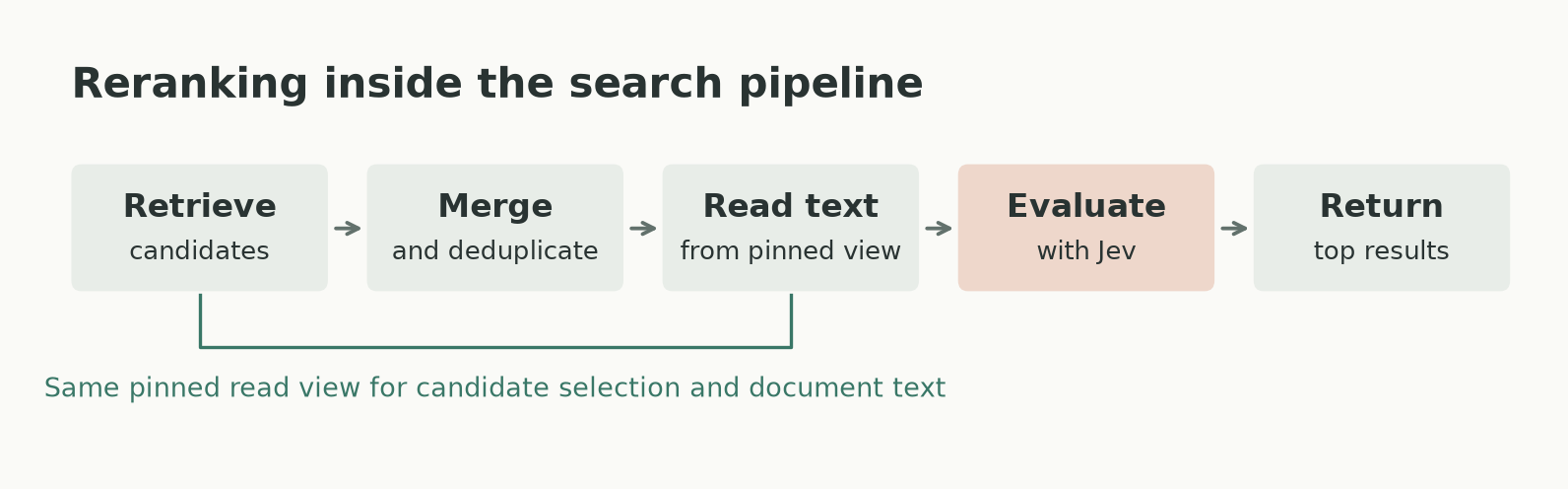
Candidate selection and the text evaluated by Jev use the same pinned read view.
The candidate depth must reach the retrieval and merge stages. Expanding only the final result array cannot recover documents already discarded upstream. We keep the retrieval depth and final response size separate, while preserving the caller's filters and search settings.
The text sent to Jev comes from the same pinned read view used to select candidates, including eligible pending writes for consistent reads. This prevents evaluating a different version of a document from the one retrieval selected.
Provider batches run with bounded concurrency and a shared stage deadline. We validate that every candidate has a valid score before applying the new order. If a batch fails, the stage follows the configured error or fallback policy; we never mix partial reranking scores with original retrieval scores. Exact score ties preserve the original candidate order.
What we measured
We evaluated 100 English queries from FiQA, a public financial question-answering dataset in the BEIR search benchmark. Its relevance labels identify which documents answer each question. We compared dense vector retrieval with and without Jev reranking, using text-embedding-3-small, 50 candidates, and two repetitions per query.
| Metric | Dense vector retrieval | With Jev reranking | Change |
|---|---|---|---|
| nDCG@10 | 0.4555 | 0.5223 | +14.7% relative |
| Macro Recall@10 | 0.5314 | 0.6167 | +8.5 percentage points |
nDCG measures how well relevant documents are ordered near the top. Macro Recall averages the fraction of relevant documents found in the top ten across questions.
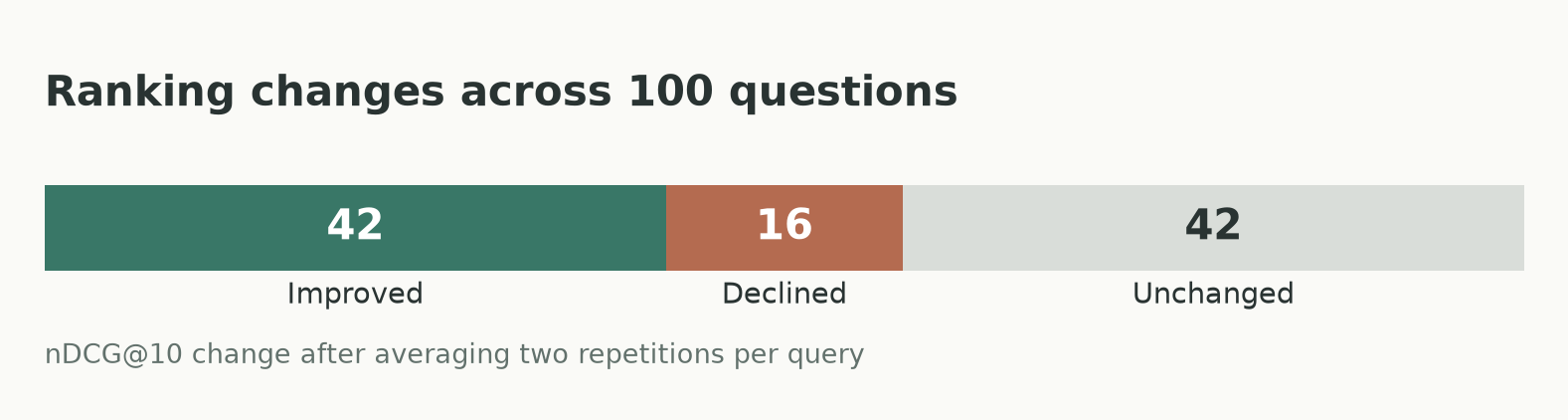
Query outcomes use the change in nDCG@10 after averaging two repetitions per query.
Individual rankings varied between runs; the evaluation measured document retrieval, not generated-answer quality.
From rank 12 to rank 1
One FiQA question asks how the probability of an American option reaching an in-the-money price before expiration compares with finishing in the money. The document labeled relevant was at rank 12 with dense vector retrieval. Jev moved it to rank 1 in both repetitions.
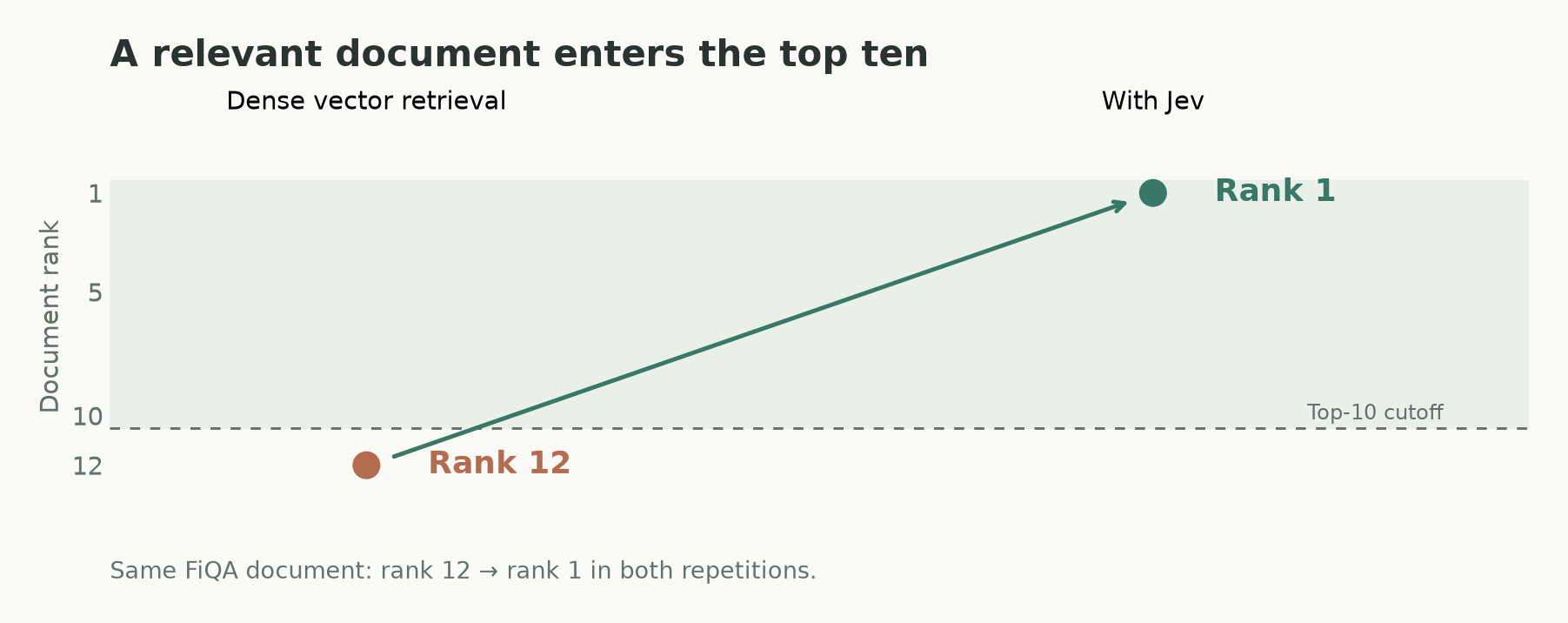
The same relevant document crosses the top-10 cutoff in both repetitions, making it available to an application using ten results.
Reranking latency
Measured on a LambdaDB deployment in AWS Asia Pacific (Seoul) (ap-northeast-2), the additional server-side reranking stage took 488 ms at p50 and 673 ms at p95 across 200 requests with 50 candidates. These are stage durations, excluding retrieval and client network time. All 200 requests succeeded without fallback or retries.
Reranking latency can vary with the region from which LambdaDB calls Jev. See Calling from Seoul and Oregon below for a comparison of provider request latency.
Comparing models on the same ranking task
We also compared Jev 1.13.0 with Cloudflare's Clef and Clef-flash in a separate direct-provider experiment: 100 FiQA queries, 50 frozen BM25S candidates, and two repetitions per model. Candidate text, order, batch membership, and the ten-level scoring rubric were held fixed, with two concurrent batches and a 60-second deadline.
| Model | nDCG@10 | Elapsed p50 | Elapsed p95 | Estimated inference cost, 200 jobs |
|---|---|---|---|---|
| Jev 1.13.0 | 0.4376 | 0.552 s | 0.781 s | $0.223 |
| Clef | 0.3442 | 3.654 s | 8.746 s | $1.388 |
| Clef-flash | 0.3056 | 1.602 s | 11.429 s | $0.519 |
The original lexical order scored 0.2808 nDCG@10. All three models improved that average, with Jev showing the highest quality, lowest elapsed time, and lowest estimated inference cost in this setup.
Elapsed time covers the full ranking job from a local client, including calls, validation, and result persistence. It is separate from the LambdaDB server-stage latency above. One Clef-flash job timed out; its elapsed time remains in the distribution and its quality metrics are computed using the original candidate order.
Costs use reported tokens and published rates as of October 5, 2026: TypeSafe's Jev rate and Cloudflare's rates. They exclude subscription fees, free allowances, and unknown timeout usage.
Follow-up checks raised questions about how Cloudflare handled long inputs, so this comparison reflects the hosted services under our test conditions.
Calling from Seoul and Oregon
We also tested whether calling from a US region changed request latency. We ran identical AWS Lambda code in Seoul and Oregon, sending the same batch of 21 candidates to each provider. The table shows median request times from nine calls per region and model, excluding the first of ten calls.
| Model | Seoul median | Oregon median |
|---|---|---|
| Jev 1.13.0 | 391 ms | 138 ms |
| Clef | 2,242 ms | 2,183 ms |
| Clef-flash | 725 ms | 773 ms |
Jev’s median fell from 391 ms in Seoul to 138 ms in Oregon. Clef’s long-input median changed little, while Clef-flash’s did not improve. One Clef-flash request in Oregon took 43.9 seconds, showing that long delays also occurred from the US. These timings cover individual provider requests, separate from the full ranking jobs above.
Testing smaller batches
We also tested smaller batches on five reused queries, with two repetitions per model and batch policy. Each job still ranked 50 candidates with two concurrent provider calls, but the smaller policy capped each batch at four candidates. Median job time rose from 6.565 to 10.036 seconds for Clef and from 1.850 to 4.892 seconds for Clef-flash. Smaller batches did not improve total ranking latency in this test.
Add reranking to a search request
Reranking works with lexical, dense/sparse vectors, and hybrid search. Retrieval finds the candidates; Jev evaluates them before LambdaDB returns the final results.
These examples assume an articles collection with text-indexed title and body fields. Pass a configured LambdaDB client to the SDK functions; for cURL, set LAMBDADB_BASE_URL, LAMBDADB_PROJECT_NAME, and LAMBDADB_PROJECT_API_KEY.
Use Python SDK 0.11.0+, TypeScript SDK 0.7.0+, or Go SDK 0.6.0+. Each example runs the same query with up to five final results and up to 50 candidates.
from lambdadb import LambdaDB, models

def search_with_reranking(client: LambdaDB):
    return client.collection("articles").query(
        size=5,
        query={
            "queryString": {
                "query": "collection version restore",
                "defaultField": "body",
            }
        },
        rerank=models.RerankConfig(
            provider="typesafe",
            model="jev-1.13.0",
            query_text="What steps restore an earlier version of a collection?",
            fields=["title", "body"],
            candidate_size=50,
        ),
    )
This request evaluates up to 50 candidates and returns up to five results. The retrieval query finds documents about collection version restoration, while queryText asks Jev to evaluate how well they explain the steps.
Reranking can only reorder documents that retrieval supplies. For vector search, set knn.k to the candidate depth you want; candidateSize does not increase it automatically.
An illustrative response, with unrelated fields omitted:
{
  "docs": [
    {
      "score": 0.80000002,
      "retrievalScore": 3.2,
      "doc": {
        "id": "restore-guide",
        "title": "Restore a collection version"
      }
    },
    {
      "score": 0.3,
      "retrievalScore": 4.1,
      "doc": {
        "id": "overview",
        "title": "Collection overview"
      }
    }
  ],
  "rerank": {
    "status": "applied",
    "candidateCount": 2,
    "scoredCount": 2,
    "took": 180
  }
}
The restore guide now ranks first despite its lower original retrieval score. Results are ordered by score, while retrievalScore preserves the original search score. The rerank metadata confirms that both candidates were scored and reports the stage duration in milliseconds.
The reranking guide provides connection setup, complete request examples, and failure-policy options.
Define what “useful” means
Start with the default relevance criteria and a clear question. If your application needs a more specific objective, add criteria to describe what makes a result useful.
For example, a support assistant may prefer complete instructions, while a question answered across several documents may need passages that supply only part of the evidence. Define the criteria for that purpose. For the support example, add this array inside rerank:
"criteria": [
  "Discusses unrelated operations or provides no usable restore guidance.",
  "Provides relevant restore guidance but omits steps required to complete it.",
  "Explains the necessary restore steps clearly enough to carry out the task."
]
Supply 2–10 distinct descriptions, ordered from lowest to highest relevance. Criteria change how candidates are evaluated. Compare them with the default on the same questions to see whether they help your application.
Try it on your own questions
Choose a fixed set of representative questions and compare retrieval with and without reranking. Check which useful documents reach the top, where ranking gets worse, and how much latency and usage the added step introduces.
Start with the default criteria and a candidate depth you can evaluate. Tune the question, retrieval depth, or criteria based on those results.
Follow the reranking guide to run your first comparison on a LambdaDB collection.
Find the results your application needs
Compare retrieval with Jev reranking on your own LambdaDB collection.
Keep reading
Adding Context to LambdaDB Collections
Use Collection descriptions and metadata tags to help people and agents understand data purpose and scope, with a code-search example.
EngineeringIntroducing Data Versioning in LambdaDB
Branch from current or historical data, pin snapshots, and route reads for AI knowledge and memory with LambdaDB.
Product