Qdrant vs. LambdaDB: A 10M-Vector Benchmark
Upsert and query performance comparison between Qdrant Cloud and LambdaDB on the Cohere Wikipedia embeddings dataset.
This benchmark is not meant to prove that one system is universally faster in every setting. Qdrant Cloud and LambdaDB use different operating models: Qdrant Cloud is a provisioned cluster, while LambdaDB is a serverless, pay-as-you-go database. The fair comparison is therefore not raw infrastructure shape, but the user-visible result under the same workload: throughput, latency, recall, scaling behavior, and operational complexity.
Key Takeaways
- Qdrant had the lowest median query latency: 33.54 ms p50, compared with 78.44 ms for LambdaDB and 53.44 ms for LambdaDB with 16 partitions.
- Tail latency was close at p95: 157.11 ms for Qdrant, 170.34 ms for LambdaDB, and 150.45 ms for LambdaDB with 16 partitions. Recall@10 was also similar at 0.98, 0.97, and 0.97 respectively.
- Qdrant scaled quickly at low concurrency, then flattened around the limit of this provisioned configuration.: 391.59 qps at 16 concurrency and 385.90 qps at 32.
- LambdaDB continued scaling without database provisioning. With 16 partitions, it reached 488.85 qps at 32 concurrency, about 26.7% higher than Qdrant in this run, while also improving latency compared with non-partitioned LambdaDB.
The benchmark is open source and reproducible: lambdadb/lambdadb-bench.
Benchmark Methodology
The benchmark used the same dataset and client region for both systems, then compared throughput, latency, and Recall@10 under identical upsert and query workloads.
| Area | Configuration |
|---|---|
| Environment | AWS us-east-1; client on r8g.2xlarge with 8 cores and 64 GB RAM |
| Qdrant Cloud | 8 cores, 32 GB RAM, 240 GB balanced disk x 3 nodes for HA, replication factor 2, $1,673.73/month |
| LambdaDB | Standard Plan, $0 minimum, pay-as-you-go, cold start |
| Dataset | Cohere Wikipedia 2023-11 multilingual embeddings; 1024-dimensional vectors; English subset |
| Upsert workload | Ingest 1M vectors into a single collection with 2,000-document batches and 64 concurrent writers |
| Query workload | Search a preloaded 10M-vector collection at 1, 2, 4, 8, 16, and 32 concurrent clients for 30 seconds each |
| Metrics | Throughput, p50/p95/p99 latency, and Recall@10 against brute-force ground truth |
A Note on Cost
We do not present monthly cost as a single headline comparison because the pricing models are different. Qdrant Cloud is priced around provisioned cluster capacity; in this run, the tested configuration was $1,673.73/month regardless of how fully the cluster is used.
LambdaDB is serverless and usage-based with no minimum charge: $0.33/GB-month for storage, $1.00/GB for writes, and $5.00/PB for reads. The actual monthly cost depends on storage, write volume, query volume, and how much data each query searches. For workloads that can use partitioning, the amount of data searched per query can be much smaller, which can materially change both latency and cost.
A fair cost comparison should therefore be scenario-based, using a fixed workload such as stored vector count, monthly query volume, monthly write volume, recall target, p95 latency target, and whether partition pruning applies.
Results
Upsert Throughput
LambdaDB ingested documents about 10.4% faster than Qdrant in this run.
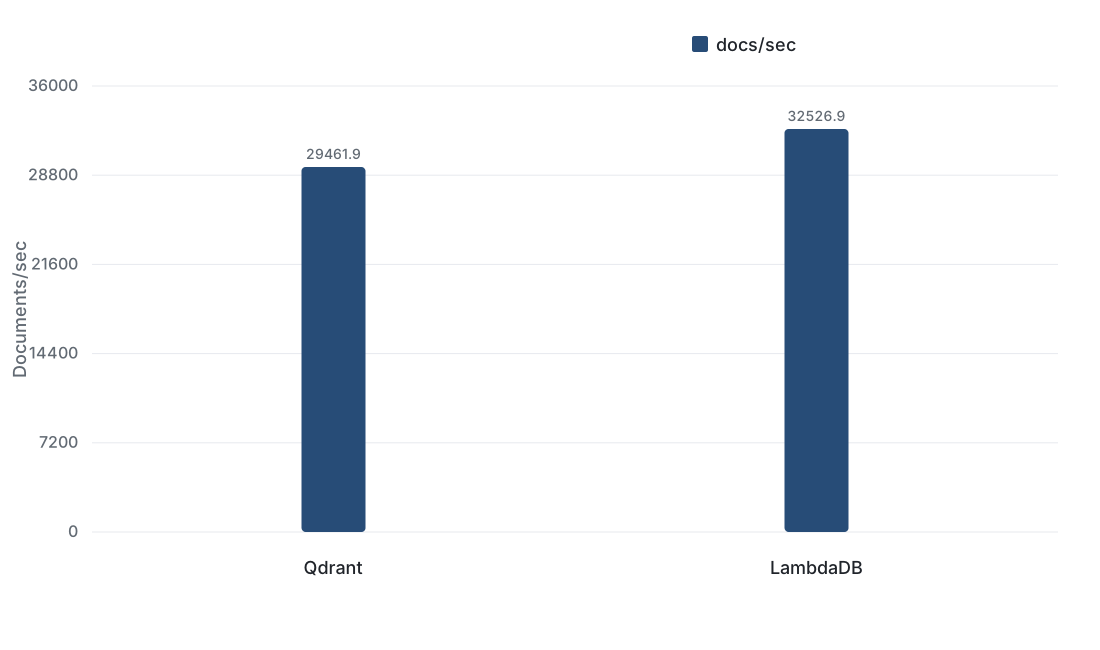
Because LambdaDB uses a distributed serverless architecture, LambdaDB may scale further with additional client-side concurrency and write parallelism, depending on workload shape, batch size, and payload size.
Query Throughput
Qdrant was much faster at low concurrency, which is expected from a warm, provisioned cluster. As concurrency increased, Qdrant flattened around 16 concurrent clients, while LambdaDB continued scaling up to the highest tested concurrency.
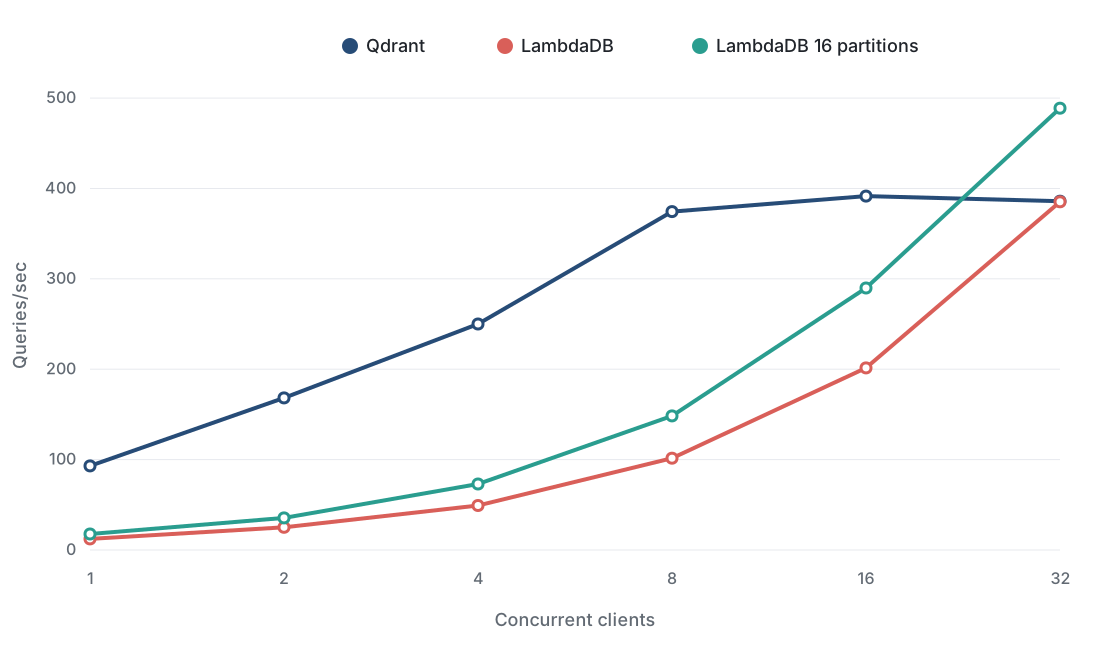
At 32 concurrency, non-partitioned LambdaDB reached nearly the same throughput as Qdrant. Partitioned LambdaDB exceeded Qdrant by about 26.7%.
Query Latency and Recall
Qdrant had the best p50 latency. Partitioned LambdaDB had the best p95 latency in this run and narrowed the p50 gap substantially compared with non-partitioned LambdaDB.
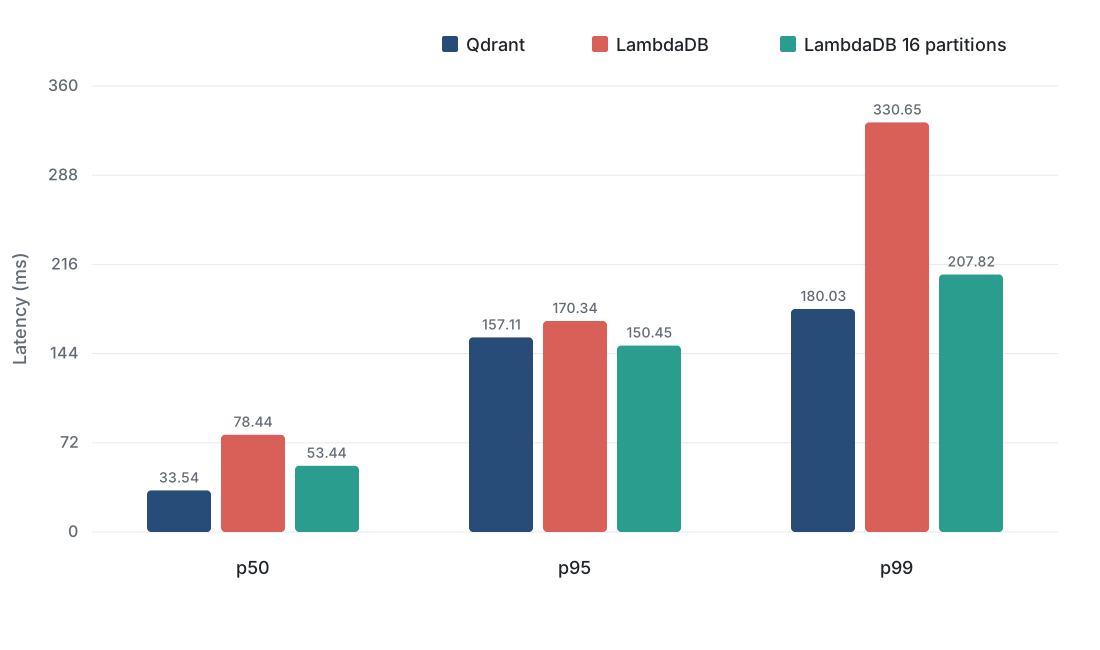
Partitioning improved LambdaDB latency across the board:
| Metric | Non-partitioned LambdaDB | LambdaDB with 16 partitions | Improvement |
|---|---|---|---|
| p50 | 78.44 ms | 53.44 ms | 31.9% lower |
| p95 | 170.34 ms | 150.45 ms | 11.7% lower |
| p99 | 330.65 ms | 207.82 ms | 37.1% lower |
| 32-concurrency throughput | 385.27 qps | 488.85 qps | 26.9% higher |
What the Results Mean
Qdrant is strongest when the workload is latency-sensitive, the cluster is already provisioned, and the team is comfortable sizing and operating vector database infrastructure. In this benchmark, it delivered excellent median latency and high throughput at low to medium concurrency.
LambdaDB is strongest when the workload needs managed serverless scaling, lower operational overhead, and built-in production features such as multi-region deployment, continuous backups, point-in-time recovery, and high availability. It does not require users to choose or resize database nodes, and in this benchmark it scaled steadily as concurrency increased.
Partitioning is especially important for large knowledge bases. If documents have a natural routing key, such as tenant, customer, project, domain, or URL, LambdaDB can search a smaller slice of the collection for each query. That improves latency and throughput while reducing query work.
When to Use Qdrant
- You need extremely low median query latency.
- You have DevOps capacity to provision, tune, monitor, and scale the cluster.
- Your workload is stable enough that provisioned capacity can be planned ahead of time.
- You want direct control over cluster sizing and infrastructure behavior.
When to Use LambdaDB
- You want a managed serverless vector database with no database provisioning.
- You have bursty or growing workloads where capacity planning is hard.
- You need multi-region deployments, continuous backups, point-in-time recovery, and high availability out of the box.
- You have a large knowledge base that can benefit from partitioning.
- You want costs to follow usage instead of committing to a fixed monthly cluster baseline.
Detailed Results
Upsert Throughput
| System | Docs/sec |
|---|---|
| Qdrant | 29461.86 |
| LambdaDB | 32526.90 |
Query Throughput
| Concurrency | Qdrant qps | LambdaDB qps | LambdaDB 16-partition qps |
|---|---|---|---|
| 1 | 93.08 | 12.27 | 17.73 |
| 2 | 168.30 | 25.15 | 35.55 |
| 4 | 250.03 | 49.27 | 73.04 |
| 8 | 374.40 | 101.57 | 148.33 |
| 16 | 391.59 | 201.51 | 289.90 |
| 32 | 385.90 | 385.27 | 488.85 |
Query Latency and Recall
| System | p50 ms | p95 ms | p99 ms | Recall@10 |
|---|---|---|---|---|
| Qdrant | 33.54 | 157.11 | 180.03 | 0.98 |
| LambdaDB | 78.44 | 170.34 | 330.65 | 0.97 |
| LambdaDB 16 partitions | 53.44 | 150.45 | 207.82 | 0.97 |
Try LambdaDB on your own workload
$0 to start. $0 at idle. Pay per query. First collection in five minutes.
Keep reading
Adding Context to LambdaDB Collections
Use Collection descriptions and metadata tags to help people and agents understand data purpose and scope, with a code-search example.
EngineeringIntroducing Data Versioning in LambdaDB
Branch from current or historical data, pin snapshots, and route reads for AI knowledge and memory with LambdaDB.
Engineering